
Ctrl+F Finds Words. I Wanted It to Find Answers.
Ctrl+F is one of those things I use hundreds of times a week, and it has never once understood what I meant.
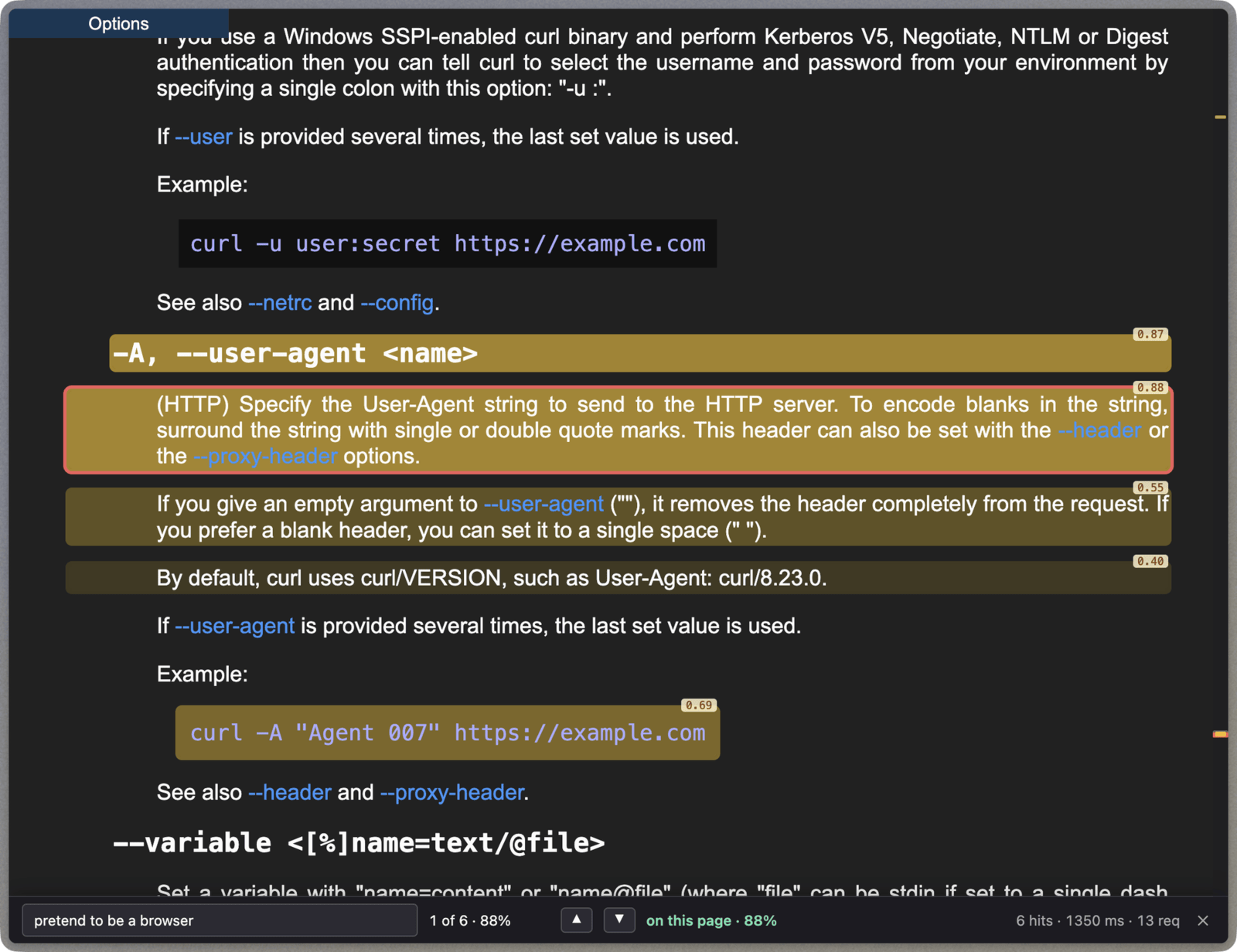
It finds letters. If the curl docs call it --user-agent and I type “pretend to be a browser”, I get nothing. So I built Hunch, a find bar that finds answers instead of words.
But first, I need to talk about the model behind it.
For the past 4 years all we hear nonstop is just AI. Every news article, every app, every tool, everything is drenched in it.
At first it was really cool, especially for me, someone who has always been into ML and who was excited about GPT-1 when I finished uni (checks date)… 8 years ago.
I used to have it generate random D&D scenarios for this Discord server I own, and it was a lot of fun. And there have been a few substantial jumps that genuinely unlocked some new things. GPT-3? o1? Sonnet 3.7?
All of these were genuinely new and exciting, but everything else has been just more of the same. Faster, but sometimes slower. Cheaper, but sometimes more expensive. Smarter, but funnily enough, sometimes dumber (Opus 4.6 vs 5 anyone?). Even the new Fable/Mythos/Sol are more or less the same (and mostly worse) than Opus. Some local AI models are more or less similar. I wrote a blog post about running them locally here.
So, all this to say: there’s finally something new in the AI game that got me excited.
Something actually new#
Two weeks ago Jev was announced, and at first glance it might seem like yet another LLM, but this one isn’t that. I was lucky enough to get access during the closed beta, before it was publicly available, so I’ve had some time to play with it.
It doesn’t generate text at all. It’s closer to those pre-LLM classifiers, but with much more intelligence and a much wider knowledge base. If you remember those “hotdog or not” classifiers back in the day, well, this can be used like that, but you don’t have to spend ages training it, because it already has a massive knowledge base similar to an LLM.
What Jev can’t do#
There are a few major downsides that you can work around, but that are quite annoying nonetheless. Jev is not multimodal, so you can’t give it a recording and ask it to tell you if the call is urgent or not. The way you’d do that is to have a speech-to-text model in front, which would then feed into Jev, which would give you a yes or a no answer.
Not being multimodal, it also can’t take images as input. So you can’t give it a photo from your doorbell and have it automatically run some Home Assistant routine based on it. To make it do that you’d need to have, maybe, an LLM that can understand and describe images first, and then send that to Jev, which will then give you a response.
So what can it do?#
OK, so Jev can’t take in images or audio, it can’t generate text, or anything else such as images, so then what can it do?
Well, the way you use Jev is you give it four things:
- State, which is the context of the question. For example, a piece of code.
- Type, which is how Jev should answer. For example, “yes or no”, and I’ll go into this in a bit.
- Question, which it should answer with the type, based on the context provided. For example, given the piece of code, is this efficient?
- Criteria. For example, for “no”: the code is deeply nested in loops.
Interesting, right? Well, let’s take a look at the types of answers Jev can give.
Noul#
First one: Noul. Fancy name, but it basically means boolean. Here is an example of how you could use this:
{
  "state": "Given a type constructor F, it has an identity transformation and a way to compose two F-mappings while preserving the structure. The composition is associative, and the identity transformation acts as an identity for that composition.",
  "questions": {
    "is_monoid_in_endofunctors": {
      "type": "noul",
      "instructions": "Is the described structure a monoid in the category of endofunctors?",
      "criteria": {
        "true": "Describes an endofunctor equipped with an associative binary composition operation and an identity element, satisfying the monoid laws",
        "false": "Does not describe a monoid structure on endofunctors, or is missing the required identity or associativity laws"
      }
    }
  }
}
As you can imagine, at runtime you can easily change what the state is, and you could then find out if what you have is a monad or not.
Choice#
The next type supported by Jev is Choice. Quite self-explanatory, really. All it does is look over your valid choices and give you a percentage for each one of them (adding up to 100%). In reality you could implement Noul in Choice, where there are just two choices: yes and no.
Here is an example:
{
  "state": "I don't want to modify the application. I just want calls to malloc() to go through my own implementation whenever this dynamically linked program starts.",
  "questions": {
    "mechanism": {
      "type": "choice",
      "instructions": "Which dynamic-linking mechanism is most directly intended for this?",
      "criteria": {
        "LD_PRELOAD": "Instructs the dynamic linker to load specified shared libraries before others, allowing symbols such as malloc() to be interposed",
        "LD_LIBRARY_PATH": "Changes where the dynamic linker searches for shared libraries but does not specifically interpose individual symbols",
        "PATH": "Controls executable lookup by the shell and other programs, not dynamic symbol resolution",
        "ldconfig": "Maintains the system's shared-library cache and does not perform per-process symbol interposition"
      }
    }
  }
}
This could be something that would help a lot if you have a system where there’s some niche knowledge that you want to direct programmatically based on the input. And I think that’s the thing that made it click for me.
Jev is not really a model that generates text, or that creates slop. The way I see it is as a pre-AI API that you can call, and it gives you a clearly defined, type-safe response that you can hook into inside of your application. It’s what structured outputs tried to be two years ago in the LLM world, but tens if not hundreds of times faster, with a guaranteed contract.
You can fully define the type of the response and put it into your program. The vast majority of tools we create, we want them to be stable, we want them to be testable, we want them to be verifiable. All of these are the antithesis of LLMs, but not of Jev.
So here is what the response would look like to that multiple-choice question:
{
  "model": "jev-1.13.0",
  "answers": {
    "mechanism": {
      "type": "choice",
      "choice": "LD_PRELOAD",
      "confidence": 1.0,
      "probabilities": {
        "LD_PRELOAD": 1.0,
        "LD_LIBRARY_PATH": 0.0,
        "PATH": 0.0,
        "ldconfig": 0.0
      }
    }
  },
  "usage": {
    "input_tokens": 328,
    "output_tokens": 34
  }
}
It’s 100% confident the answer is LD_PRELOAD, and does not think any of the other ones could do it. In your program you could then have a guard that picks the top answer, but only if the confidence is above, I don’t know, 80%. And because the price is dirt cheap, you can run thousands of these without worrying.
Not to mention the speed. Instead of waiting seconds, or minutes (if running locally), for an LLM, this comes back in a quarter of a second.
Score#
And the last type supported by Jev is Score. Here you can ask it to give you a percentage of probabilities based on a scoring criteria defined by you. For example, let’s say you want to be able to query the system CPU usage and load average, and you want to know how overloaded the machine is.
You could get all the info you need in bash like:
echo "load average: $(awk '{print $1", "$2", "$3}' /proc/loadavg) | CPUs: $(nproc)"
And then you could fit this into the state of a Jev request such as:
{
  "state": "load average: 48.21, 51.03, 49.87 | CPUs: 8",
  "questions": {
    "system_severity": {
      "type": "score",
      "instructions": "How severe is the current CPU load?",
      "criteria": [
        "Normal",
        "Elevated but manageable",
        "Severely overloaded"
      ]
    }
  }
}
The criteria there basically define a score from 0 (Normal) to 2 (Severely overloaded). Here is what Jev would answer back with:
{
  "model": "jev-1.13.0",
  "answers": {
    "system_severity": {
      "type": "score",
      "score": 1.97,
      "confidence": 0.98,
      "legend": {
        "0": "Normal",
        "1": "Elevated but manageable",
        "2": "Severely overloaded"
      },
      "probabilities": {
        "0": 0.0,
        "1": 0.03,
        "2": 0.97
      }
    }
  },
  "usage": {
    "input_tokens": 291,
    "output_tokens": 18
  }
}
That means out of our 2 maximum points, Jev thinks this is a 1.97, which is very high, so the system is very overloaded. And it is 98% confident of this grading.
A million ways to use this#
You can probably already think of a million ways to use this. I know I do. There are tons and tons of Home Assistant functions I could hook up to something like this, where the state changes and it’s hard to program all the requirements in. Here’s an example of maybe a state you could feed in about your house, and the question could be something like “is anything suspicious happening”:
Front door: closed
Garage door: open
Motion: none
House mode: away
Kitchen lights: on
TV: off
Is it possible to code something up like this? Yes, absolutely, but you can imagine all sorts of weird, niche scenarios you can’t think of that would be picked up by something like Jev, which again is just part of your request chain, with a clear answer you can then script around, by sending you a notification for example.
A smarter Ctrl+F#
After seeing all of these things, and just being excited to use Jev, one of the main things that instantly came to mind was something I’d tried to do with LLMs a couple of years ago: a smarter, semantic Ctrl+F search on a page.
You probably know what I’m talking about. Imagine you’re on a huge documentation website and you know the general gist of what you’re looking for, because you’ve used this tool before, but you can’t remember the exact wording they used on the page. So what you want to do is search the page really quickly, find it, and then keep reading.
What do people nowadays do? Well, they probably just ask an LLM, right? They send it the link and ask “hey, how do I do X or Y?”. But I think it’s really important to know how to read documentation and how to think critically, so I’d rather keep reading it myself and just find things in it quickly.
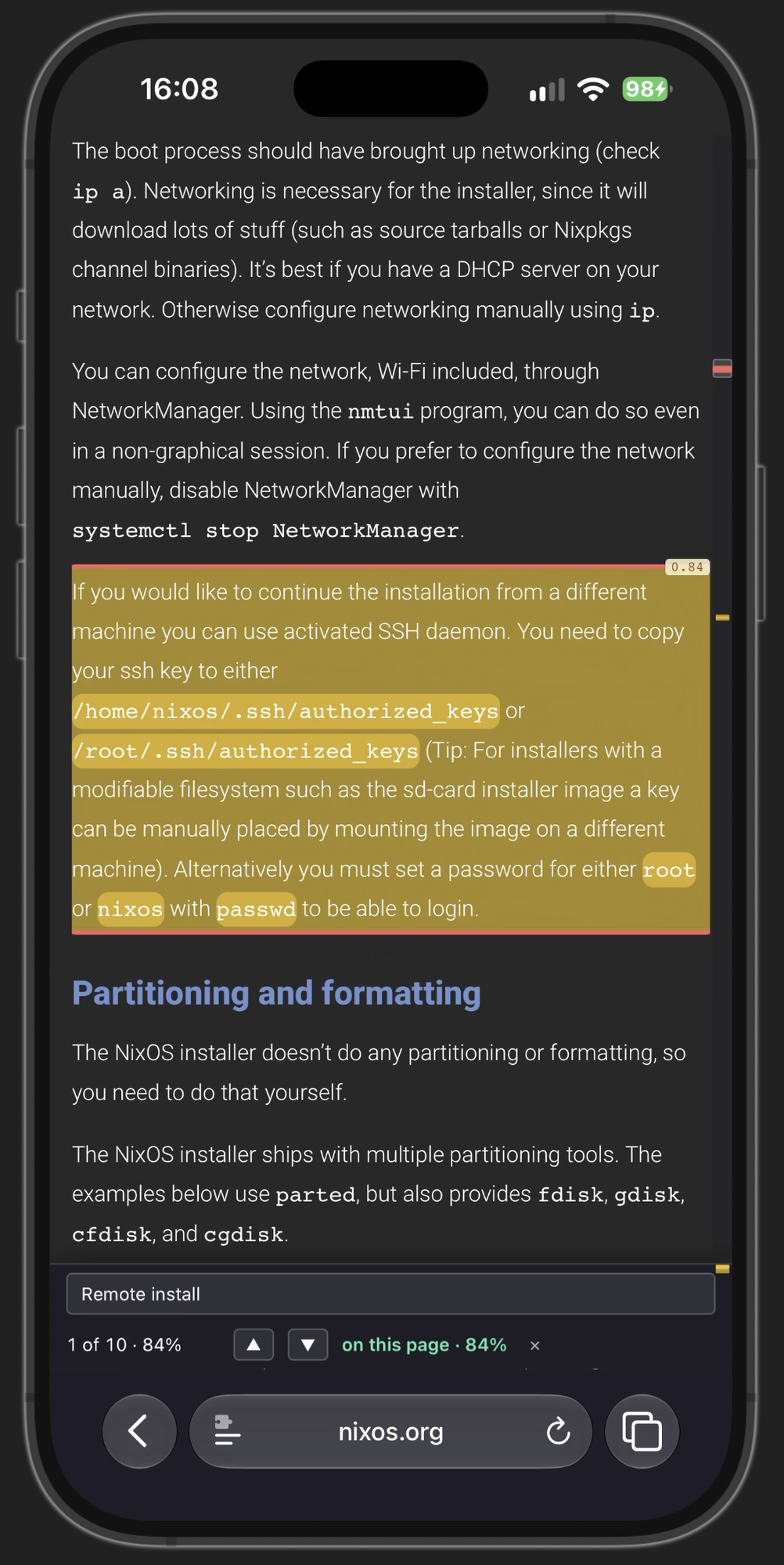
So I created this extension called Hunch. It uses Jev under the hood, and what it does is basically this: when you press the equivalent of Command+F, it shows a search box on the page and lets you search. What the extension does in the background is it splits the page into paragraphs and asks Jev, for every single one of them, does this paragraph answer the user’s search? And then Jev basically says yes or no using the Noul question type, and grades its confidence for each one of them.
Which means that at the end of this request, after they all came back from Jev, I can take the ones with the highest confidence and show them as search results on the page to the user, just like you do with Ctrl+F. I also added a thing where, depending on how confident Jev is, the highlight is a bit stronger, or more transparent if it’s not super confident in it.
Here’s the difference in practice. I search the same NVIDIA page on the Arch Wiki, first with the normal browser find, then with Hunch (best watched with sound on):
It worked quite well for me. I used it for a couple of days, and since then I submitted it to the Chrome Web Store, the Mozilla one, as well as Safari. So you can download it on the App Store for your Mac and iOS, and the Chrome and Firefox extensions work on Android as well, so you can use this basically anywhere. I’ve been using it nonstop. And honestly, I’ve barely scratched half a dollar or something like that on the API costs. It costs basically nothing, and if you create an account with them you get like $5 each month. So this is fully free for you to use if you want to, and I think it’s a pretty neat tool.
The annoying bit#
There was one annoying thing that I had to contend with while developing it, and I think that’s really interesting to talk about. I see very few people online talking about things like this, which makes me think they don’t actually use the tool that they’re hyped about.
Jev has an incredibly small context size. Just to give you an example, some LLMs have a context window of a million tokens, some have two million. For Jev it’s:
- 64k tokens for the state plus all the questions together.
- 32k tokens for the state plus the longest single question.
That’s absolutely nothing, which meant that I had to chunk up the page. There was no way for me to send the whole page, especially on a massive page, which is exactly where you’d want to use my extension. So I basically grouped the paragraphs into chunks as big as the limits allow, sent those over, and then when they came back I could show which paragraphs are or aren’t an answer to your query.
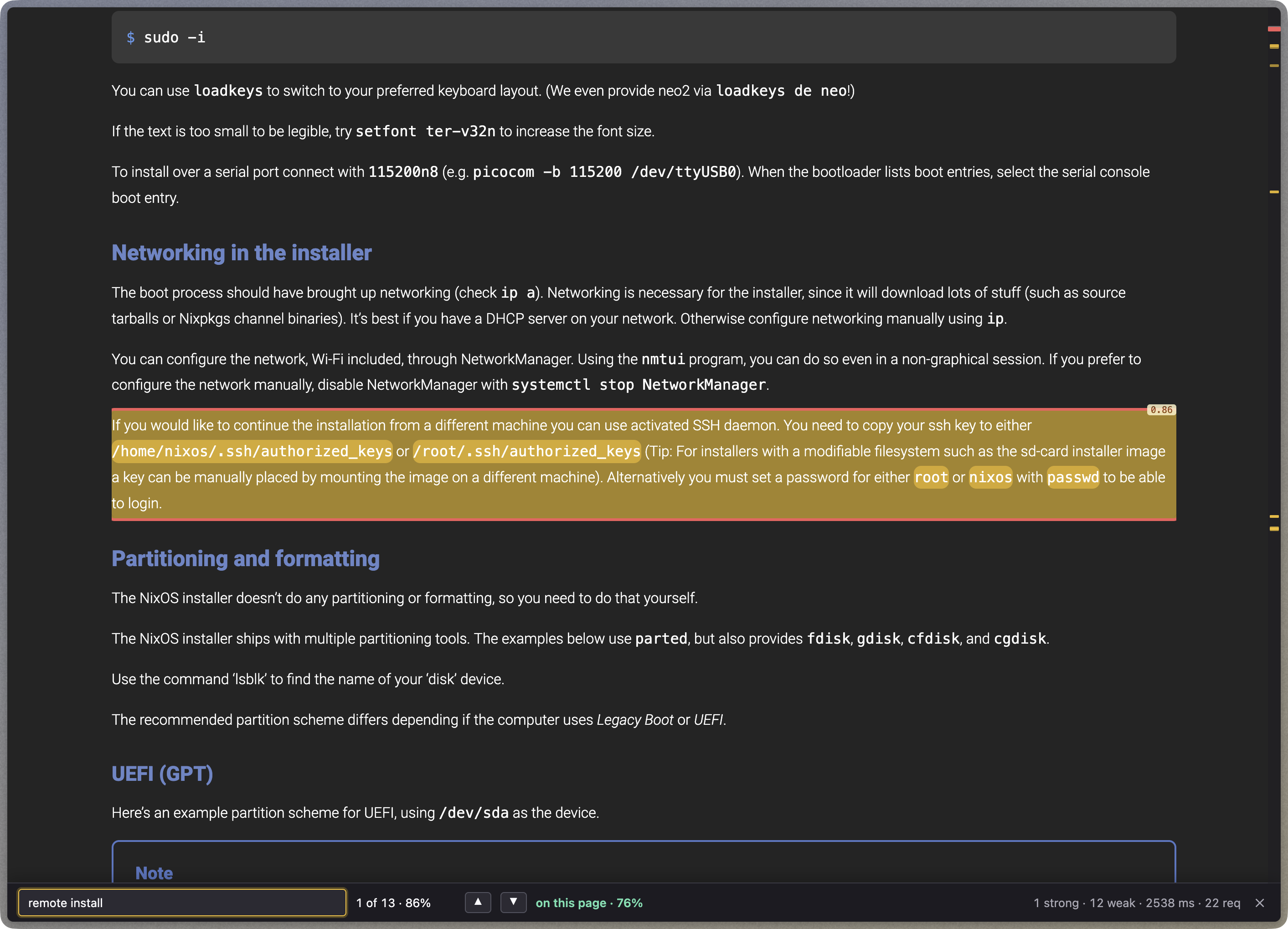
Here you can see me searching for “remote install” on the NixOS manual, and it found me a block with 86% confidence, which was actually exactly what I was looking for.
Try it yourself#
If you want to download this extension you can find it here:




Or you can go to github.com/tymscar/hunch and compile it yourself. I’d love to see you contribute to it and make it better too.
The code is written in the vast majority by me, with the privacy policy being vibe coded because life is too short to learn how to do one of those. The build.mjs is too, and I’m looking into rearchitecting that to make it easier to maintain.