
I Tried Gleam for Advent of Code, and I Get the Hype
I do Advent of Code every year.
For the last seven years, including this one, I have managed to get all the stars. I do not say that to brag. I say it because it explains why I keep coming back.
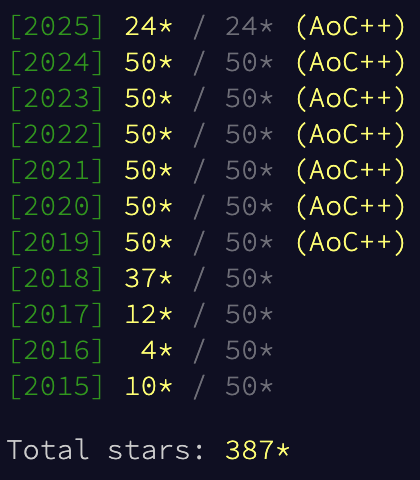
It is one of the few tech traditions I never get bored of, even after doing it for a long time. I like the time pressure. I like the community vibe. I like that every December I can pick one language and go all in.
This year, I picked Gleam.
A much shorter year#
Advent of Code is usually 25 days. This year Eric decided to do 12 days instead.
So instead of 50 parts, it was 24.
That sounds like a relaxed year. It was not, but not in a bad way.
The easier days were harder than the easy days in past years, but they were also really engaging and fun to work through. The hard days were hard, especially the last three, but they were still the good kind of hard. They were problems I actually wanted to wrestle with.
It also changes the pacing in a funny way. In a normal year, by day 10 you have a pretty comfy toolbox. This year it felt like the puzzles were already demanding that toolbox while I was still building it.
That turned out to be a perfect setup for learning a new language.
Why Gleam felt like a good AoC language#
Gleam is easy to like quickly.
The syntax is clean. The compiler is helpful, and the error messages are super duper good. Rust good.
Most importantly, the language strongly nudges you into a style that fits Advent of Code really well. Parse some text. Transform it a few times. Fold. Repeat.
Also, pipes. Pipes everywhere. I love pipes.
One thing I did not expect was how good the editor experience would be. The LSP worked much better than I expected. It basically worked perfectly the whole time. I used the Gleam extension for IntelliJ and it was great.
https://plugins.jetbrains.com/plugin/25254-gleam-language
I also just like FP.
FP is not always easier, but it is often easier. When it clicks, you stop writing instructions and you start describing the solution.
The first Gleam superpower: echo#
The first thing I fell in love with was echo.
It is basically a print statement that does not make you earn it. You can echo any value. You do not have to format anything. You do not have to build a string. You can just drop it into a pipeline and keep going.
This is the kind of thing I mean:
list.range(0, 5)
|> echo
|> list.map(int.to_string)
|> echo
You can quickly inspect values at multiple points without breaking the flow.
I did miss string interpolation, especially early on. echo made up for a lot of that.
It mostly hit when I needed to generate text, not when I needed to inspect values. The day where I generated an LP file for glpsol is the best example. It is not hard code, but it is a lot of string building. Without interpolation it turns into a bit of a mess of <>s.
This is a small excerpt from my LP generator:
"Minimize\n"
<> "  total: "
<> buttons
|> string.join(" + ")
<> "\n\nSubject To\n"
It works. It is just the kind of code where you really feel missing interpolation.
Options everywhere, and why that matters for grid puzzles#
A lot of AoC is grids.
Grids are where you normally either crash into out of bounds bugs, or you litter your code with bounds checks you do not care about.
In my day 4 solution I used a dict as a grid. The key ergonomic part is that dict.get gives you an option-like result, which makes neighbour checking safe by default.
This is the neighbour function from my solution:
fn get_neighbours(grid: Grid(Object), pos: Position) -> List(Object) {
  [
    #(pos.0 - 1, pos.1 - 1),
    #(pos.0 - 1, pos.1),
    #(pos.0 - 1, pos.1 + 1),
    #(pos.0, pos.1 - 1),
    #(pos.0, pos.1 + 1),
    #(pos.0 + 1, pos.1 - 1),
    #(pos.0 + 1, pos.1),
    #(pos.0 + 1, pos.1 + 1),
  ]
  |> list.filter_map(fn(neighbour_pos) { grid |> dict.get(neighbour_pos) })
}
That last line is the whole point.
No bounds checks. No sentinel values. Out of bounds just disappears.
The list toolbox is genuinely good#
I expected to write parsers and helpers, and I did. What I did not expect was how often Gleam already had the exact list function I needed.
list.transpose saved a whole day#
Day 6 part 1 was basically a transpose problem in disguise.
I read the input, chunked it into rows, transposed it, and suddenly the rest of the puzzle became obvious.
input
|> list.transpose
|> list.map(fn(line) { line |> calculate_instruction })
|> bigi.sum
In a lot of languages you end up writing your own transpose yet again. In Gleam it is already there.
list.combination_pairs is a cheat code#
Another example is list.combination_pairs.
In day 8 I needed all pairs of 3D points. In an imperative language you would probably write nested loops and then question your off by one logic.
In Gleam it is a one liner:
boxes
|> list.combination_pairs
Sometimes FP is not about being clever. It is about having the right function name.
fold_until is my favorite thing I found#
If I had to pick one feature that made me want to keep writing Gleam after AoC, it is fold_until.
Early exit without hacks is fantastic in puzzles.
In day 8 part 2 I kept merging sets until the first set in the list contained all boxes. When that happens, I stop.
The core shape looks like this:
|> list.fold_until(initial, fn(acc, pair) {
  case done_yet {
    True -> Stop(new_acc)
    False -> Continue(new_acc)
  }
})
It is small, explicit, and it reads like intent.
I also used fold_until in day 10 part 1 to find the smallest combination size that works.
Where Gleam fought me a bit#
Even though I enjoyed Gleam a lot, I did hit a few recurring friction points.
None of these are deal breakers. They are just the kind of things you notice when you do 24 parts in a row.
File IO is not in the standard library#
This one surprised me on day 1.
For AoC you read a file every day. In this repo I used simplifile everywhere because you need something. It is fine, I just did not expect basic file IO to be outside the standard library.
Regex is a dependency too#
Day 2 part 2 pushed me into regex and I had to add gleam_regexp.
This is the style I used, building a regex from a substring:
let assert Ok(re) = regexp.from_string("^(" <> substring <> ")+$")
regexp.check(re, val)
Again, totally fine. It just surprised me.
List pattern matching limitations#
You can do [first, ..rest] and you can do [first, second].
But you cannot do [first, ..middle, last].
It is not the end of the world, but it would have made some parsing cleaner.
Comparisons are explicit#
In Gleam a lot of comparisons are not booleans. You get an order value.
This is great for sorting. It is also very explicit. It can be a bit verbose when you just want an <= check.
In day 5 I ended up writing patterns like this:
case cmp_start, cmp_end {
  order.Lt, _ -> False
  _, order.Gt -> False
  _, _ -> True
}
Big integers, and targeting JavaScript#
I used bigi a few times this year.
On the Erlang VM, integers are arbitrary precision, so you usually do not care about overflow. That is one of the nicest things about the BEAM.
If you want your Gleam code to also target JavaScript, you do care. JavaScript has limits, and suddenly using bigi becomes necessary for some puzzles.
I wish that was just part of Int, with a single consistent story across targets.
The most satisfying part: XOR as bitmasks#
Day 10 part 1 was my favorite part of the whole event.
The moment I saw the toggling behavior, it clicked as XOR. Represent the lights as a number. Represent each button as a bitmask. Find the smallest combination of bitmasks that XOR to the target.
This is the fold from my solution:
combination
|> list.fold(0, fn(acc, comb) {
  int.bitwise_exclusive_or(acc, comb)
})
It felt clean, it felt fast, and it felt like the representation did most of the work.
The least satisfying part: shelling out to glpsol#
Day 10 part 2 was the opposite feeling.
I knew brute force was out. It was clearly a system of linear equations.
In previous years I would reach for Z3, but there are no Z3 bindings for Gleam. I tried to stay in Gleam, and I ended up generating an LP file and shelling out to glpsol using shellout.
It worked, and honestly the LP format is beautiful.
Here is the call:
let _ =
  shellout.command(
    "glpsol",
    ["--lp", "temp.lp", "-w", "temp_sol.txt"],
    ".",
    [],
  )
It is a hack, but it is a pragmatic hack, and that is also part of Advent of Code.
Memoization keys that actually model the problem#
Day 11 part 2 is where I was happy I was writing Gleam.
The important detail was that the memo key is not just the node. It is the node plus your state.
In my case the key was:
#(neighbour, new_seen_dac, new_seen_fft)
Once I got the memo threading right, it ran instantly.
The finale, and the troll heuristic#
The last day was the only puzzle I did not fully enjoy.
Not because it was bad. It just felt like it relied on assumptions about the input, and I am one of those people that does not love doing that.
I overthought it for a bit, then I learned it was more of a troll problem. The “do the areas of the pieces, when fully interlocked, fit on the board” heuristic was enough.
In my solution it is literally this:
heuristic_area <= max_area
Sometimes you build a beautiful mental model and then the right answer is a single inequality.
Closing thoughts#
I am very happy I picked Gleam this year.
It has sharp edges, mostly around where the standard library draws the line and a few language constraints that show up in puzzle code. But it also has real strengths.
Pipelines feel good. Options and Results make unsafe problems feel safe. The list toolbox is better than I expected. fold_until is incredible. Once you stop trying to write loops and you let it be functional, the solutions start to feel clearer.
I cannot wait to try Gleam in a real project. I have been thinking about using it to write a webserver, and I am genuinely excited to give it a go.
And of course, I cannot wait for next year’s Advent of Code.
If you want to look at the source for all 12 days, it is here:
https://github.com/tymscar/Advent-Of-Code/tree/master/2025/gleam/aoc/src