
Automating What Backblaze Lifecycle Rules Don’t Do Instantly
I recently moved from Synology to TrueNAS and set up cloud backups to Backblaze B2. I have two buckets: one for important files like documents, and one for homelab services. The services bucket backs up things like qcow2 disk images for my VMs, some of which are hundreds of gigabytes.
When I created the buckets, I set the lifecycle rule to “Keep only the last version of the file.” I assumed this meant Backblaze would automatically replace old versions when new ones arrived. It doesn’t work that way.
The problem#
After a few days of backups, I noticed something odd. My bucket was showing way more storage than expected. Looking at individual files, I could see multiple versions stacking up despite the lifecycle rule being set.
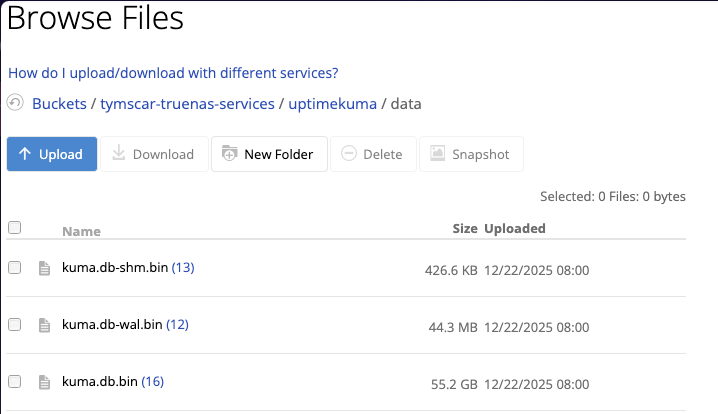
I contacted Backblaze support to figure out what was going on. The support agent explained that lifecycle rules take 48 hours to kick in. Even after that, the cleanup only runs once every 24 hours. So if TrueNAS pushes a new version of a 100GB qcow2 file, both versions exist on Backblaze for up to 24 hours before the old one gets deleted.
This matters because Backblaze charges based on daily usage, not monthly snapshots. Every day they calculate how much data you’re storing and add it to your bill. If I back up my services every 6 hours and have a 100GB file, instead of ending the day with a single 100GB file, I could have 4 or 5 versions sitting there. That’s potentially 500GB of billable storage for what should be 100GB. The cleanup doesn’t run at exactly 24 hours either, so it can drift even worse. Multiply this across dozens of large files and it adds up fast.
When I checked how many old versions had accumulated, the numbers were worse than I expected:
| Bucket | Old versions |
|---|---|
tymscar-truenas-services | 21,377 |
tymscar-truenas-important | 7 |
Over 21,000 hidden versions in the services bucket alone.
The fix#
The support agent suggested I could either wait for the lifecycle rules to eventually clean things up, or delete the old versions manually. Waiting meant paying for storage I didn’t need. Manual deletion through the web UI for 21,000 files wasn’t happening.
Enter rclone cleanup. This command specifically removes old versions from B2 buckets. One command, all the hidden versions gone:
rclone cleanup b2:tymscar-truenas-services
I set up rclone on my NixOS homelab server using home-manager, with the B2 credentials stored in agenix. If you’ve read my previous post on Docker containers with secrets, you’ll recognise the pattern. Then I added a simple systemd timer that runs rclone cleanup every 15 minutes against both TrueNAS buckets:
{ pkgs, ... }:

{
  systemd.services.b2-cleanup = {
    description = "Clean up old B2 file versions";
    serviceConfig = {
      Type = "oneshot";
      ExecStart = "${pkgs.bash}/bin/bash -c '${pkgs.rclone}/bin/rclone cleanup b2:tymscar-truenas-services && ${pkgs.rclone}/bin/rclone cleanup b2:tymscar-truenas-important'";
      User = "tymscar";
    };
  };

  systemd.timers.b2-cleanup = {
    wantedBy = [ "timers.target" ];
    timerConfig = {
      OnBootSec = "5min";
      OnUnitActiveSec = "15min";
      Persistent = true;
    };
  };
}
After the first run, all 21,000+ old versions were gone. Now the timer catches any new ones before they can accumulate. Instead of paying for 500GB of duplicate versions, I briefly hit 200GB during a backup and it’s cleaned up within 15 minutes.
Lessons learned#
Backblaze’s lifecycle rules work, but they’re not instant. If you’re backing up large files frequently, those 24-hour windows add up. The rclone cleanup command is the missing piece that should probably be in every TrueNAS-to-Backblaze backup guide.
I also learned that Backblaze support is genuinely helpful if you can get past the chatbot. Typing “real human please” into the initial prompt seems to do the trick.